Ask ten people in a company what data lineage is and you will get ten answers. The data engineer draws a line from a source table to a dashboard. The compliance officer talks about audit trails. The architect wants to know which flows will stop working if a connector changes. They are all right, and that is exactly the problem. Data lineage is almost always explained as one picture, and one picture cannot serve all of them.
In this article we look at what lineage is, why it earns its place in any serious data landscape, and how the well known tools on the market treat it. Then we make a case that most of them miss something. Data is not one view. It is four.
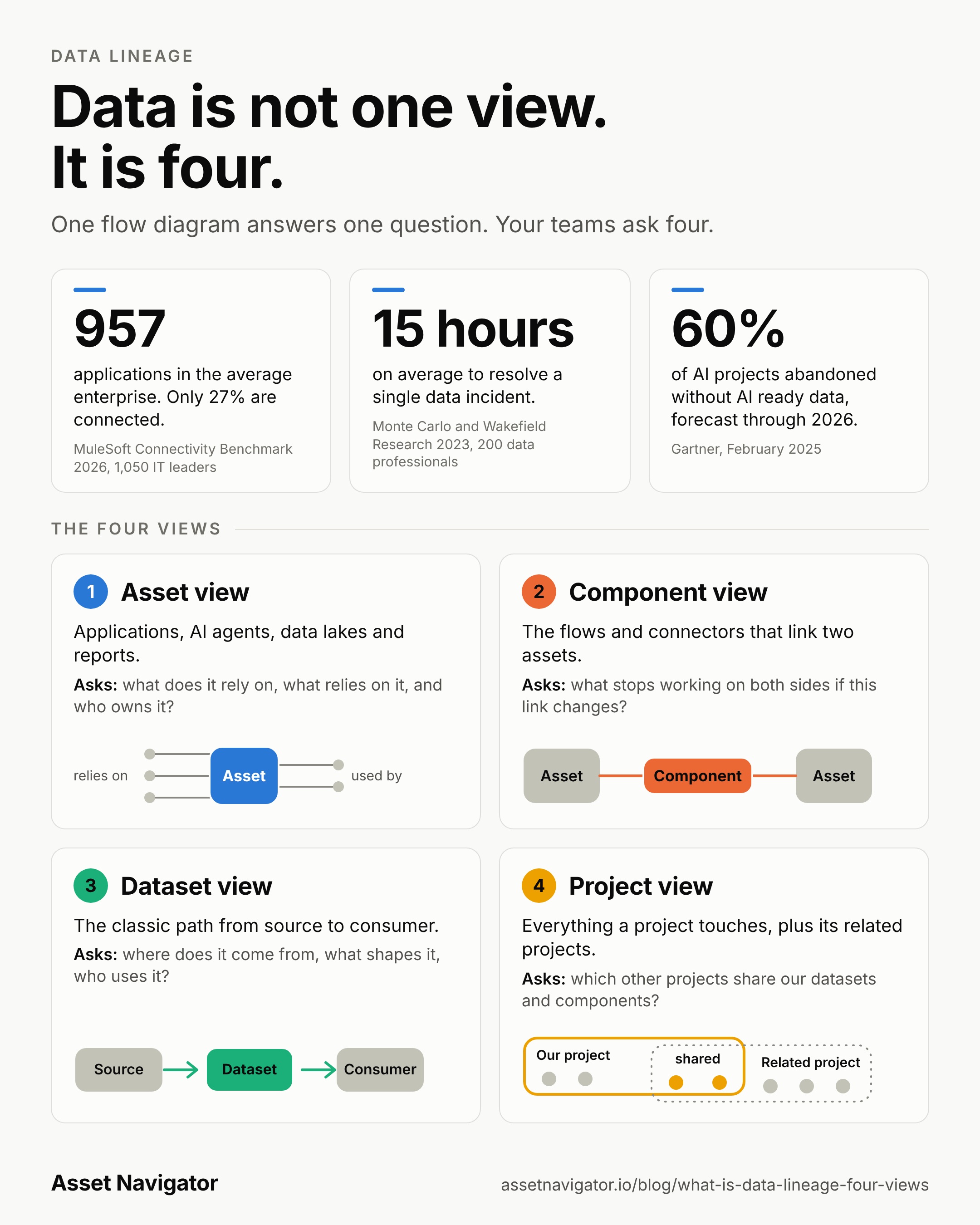
957 applications. That is the average number an enterprise runs today, according to the 2026 Connectivity Benchmark from MuleSoft, which surveyed 1,050 IT leaders in February 2026. Only 27 percent of those applications are connected to each other, and 82 percent of the IT leaders call data integration one of their biggest challenges when rolling out AI. The same report says half of all AI agents work in isolation instead of as part of a larger system.
15 hours. That is the average time to resolve a single data incident in the 2023 State of Data Quality survey by Monte Carlo and Wakefield Research, which asked 200 data professionals. In the same survey 74 percent said the business users, not the data team, are the ones who spot a problem first all or most of the time. That was 47 percent a year earlier.
60 percent. Gartner forecasts that through 2026 organisations will abandon 60 percent of AI projects that are not supported by AI ready data. In a survey of 248 data management leaders in the third quarter of 2024, 63 percent said they either lack the right data management practices for AI or are not sure whether they have them.
Keep in mind that the first two surveys come from vendors in the integration and data quality space, so they have a view of their own. The direction is hard to argue with though. There are more systems than ever, they hardly talk to each other, problems take long to find, and AI is raising the stakes.
Sources:
Data lineage is the record of where data comes from, what happens to it along the way, and where it ends up. A source system feeds a pipeline, the pipeline fills a table, a report reads from that table, and somebody makes a decision based on the report. Lineage keeps that chain visible, so nobody has to rebuild it from memory, old emails or a colleague who left two years ago.
The idea is simple. The hard part is keeping it true, because pipelines, flows and reports change every week.
Trust in the numbers. When a figure in a report looks wrong, the first reaction in most organisations is an argument about whose number is right. With lineage you skip the argument and walk back through the chain until you find the step where things went off track. That can turn a week of investigation into an afternoon.
Changing things without fear. Before you rename a column, switch off a flow or retire a report, you want to know what depends on it. Without lineage the honest answer is that you will find out when somebody complains. With lineage you can see the blast radius first and warn the right people before anything breaks.
Audits and regulation. Regulators and auditors ask where personal or financial data travels and who touches it. Some vendors now sell whole products just to trace a number in a regulatory filing back to its source. If you can show the path, the conversation is short. If you cannot, it is long and expensive.
Reuse. A large share of new pipelines exist because nobody knew a similar one was already running. Lineage shows what exists and what it feeds, so architects and engineers can build on it instead of duplicating it.
AI. Agents and AI assistants give answers based on data, and people now ask where those answers came from. Vendors have started adding lineage for AI agents for this reason. If you cannot trace an answer to its data, you cannot really trust it.
Before writing this we read the public documentation and product material of the main vendors. We did not test them hands on, so treat this as a careful reading and not a verdict. What we looked for was simple: do they let you look at your landscape from more than one angle, or do they follow the data from start to consumer?
Collibra offers a business lens and a technical lens. The technical one shows tables, columns, queries and transformation code for engineers. The business one shows the relations between catalog assets for analysts and stewards. Two audiences, but one subject: data moving between systems.
Atlan builds lineage from assets and the processes between them, down to column level, across warehouses, pipelines and BI tools. On top of that it adds impact analysis and root cause analysis. It is strong, and the question it answers is always how data travels from source to dashboard.
Microsoft Purview models lineage as datasets connected through processes, with a column view for each dataset. A Microsoft support answer about simplifying large graphs suggests scoping by collection or data product, and mentions that there is no built in switch between business and technical modes.
Alation covers table, column, report and cross system lineage, plus a business lineage view. In August 2026 it added Critical Lineage, aimed at tracing a metric in a regulatory filing back to its authoritative source. That is a very specific chain, followed from report back to origin.
Informatica and IBM Manta both let you start with a summary at system or application level and drill down to tables and columns. It is the same journey at a different zoom level.
Cloudera Octopai comes closest to the idea that data has more than one view. It describes three layers: cross system lineage, inner system lineage inside a single ETL process, report or database object, and end to end column lineage. The inner system layer is a step towards looking at the parts of an asset. Even so, all three layers still describe how data moves.
Microsoft Fabric gives every workspace a lineage view of all its items, which is the nearest thing to a project view we found. A workspace is a technical container though, and the lineage view stops at its edge. Impact analysis can reach across workspaces, the lineage view cannot. dbt has a project lineage view too, but only for what lives inside dbt. OpenLineage is an open standard built around jobs, runs and datasets. It is useful plumbing, and it is not a view at all.
The tools differ in how far you can zoom, from system to table to column, and in who is looking, business or technical. Nearly all of them are anchored on one question: where does the data come from, and where does it go? We did not find a vendor that presents lineage as several parallel viewpoints on the same landscape, with a project as one of them, and none that relates projects to each other through the datasets and components they share. A vendor may well have features that are not in its public material, so we say this with some care. Still, the pattern is clear enough.
At Asset Navigator we think the single flow diagram is only one slice of what people need to know. Depending on who you are and what you are about to do, you ask a different question. These are the four views we believe a complete picture needs.
An asset is a thing someone built or bought and someone owns: an application, an AI agent, a data lake, a report. The asset view asks what this particular thing relies on, what relies on it, and who is responsible for it. Before you retire an application or hand a report to a new team, this is the page you open.
Components are the links between assets. A component sits between two assets and describes how they are connected: a Power Automate flow that takes data from an application and writes it into a data lake, a pipeline, a connector, an API integration.
The component view asks which two assets this link joins, and what stops working on both sides when it changes. If a service account password is rotated, or a connector is deprecated, or an external API changes, you need the list of every component that is affected and the assets at both ends of each one.
A diagram that only follows the data cannot give you that, because the flow or the connector is not data. It is a dependency.
This is the classic lineage view and it still matters. Where does this dataset originate, which transformations shape it, and who consumes it? It is the view for the data steward, the analyst checking a number, and the compliance officer following personal data through the landscape.
A project cuts across the other three. It has a purpose, a team, a start and sometimes an end. The project view shows which assets a project produced or uses, which datasets and components sit behind them, and what else is touched. It answers questions that managers and architects actually ask. What is in scope for this migration? What do we have to hand over? What gets affected if this project is delayed or cancelled?
A project also never stands alone in a modern IT landscape. That is why the project view shows related projects too. Two projects are related when they reuse the same datasets or the same components, even if the teams have never spoken to each other. When a dataset changes, you see which other projects read it. When a flow is replaced, you see which projects depend on it. Without this, people assemble the picture by hand in a spreadsheet, and the spreadsheet is out of date on the day it is finished.
The same fact looks different from each side. Take a report. It is an asset. It is fed by a Power Automate flow, which is a component linking an application to a data lake, and those two are assets as well. The flow reads and writes datasets. The whole chain belongs to a project, and that project shares datasets and components with two others.
If you only have the dataset view you will miss the flow that is about to be switched off. If you only have the asset view you will miss the shared dataset that thirty other things depend on. Different roles start in different places, and a good catalog lets them all arrive at the same truth from their own direction.
Four views sound like four times the documentation work, and nobody has time for that. This is where automation matters. In an earlier article, How to Use AI Agents to Automatically Fill Your Asset Navigator we described how organisations can run their own AI Agents inside their own environment, read what they are allowed to read, and send it to Asset Navigator through our API. The agent can read a flow, list its connectors, and write the documentation. The same collected information feeds all four views, because assets, components, datasets and projects are all described by the same raw material.
The organisation stays in control of what is read and what is sent. We only receive what they choose to upload.
You do not need all four views on day one. Pick one question that hurts today. Maybe it is what breaks if a connector changes, or what exactly belongs to the migration project, or where a particular dataset really comes from. Answer that one with the right view, and let the rest follow. Lineage that people open every week is worth far more than lineage that was drawn once and admired.
See the 4 views of what already exists before anyone builds it again. Try Asset Navigator free, up to 50 assets.