
No more outdated diagrams
A drawn diagram is outdated after the next change. In Asset Navigator, one update to a connection refreshes every view.
For IT Architects
Asset Navigator gives you one global view of your landscape: applications, AI agents, datasets, flows and external providers, with every upstream and downstream connection, across all your projects. See what can be reduced, what can be reused, which risks need mitigating and what needs updating, then assess the impact before you commit.
Why IT Architects use it
A drawn diagram is outdated after the next change. In Asset Navigator, one update to a connection refreshes every view.
One flow, dataset or provider can sit behind many critical systems. Asset Navigator shows everything that depends on it, and what is business or regulatory critical.
Each change request means interviewing teams again. With Asset Navigator, every review starts from the existing map and its impact analysis.
HOW ARCHITECTS USE IT
Applications, AI agents, data lakes, reports and external providers in one map, each with its risk profile and business critical or regulatory critical flag.
Every flow, connector and API between two assets. Find the shared components that many systems rely on before you replace or retire them.
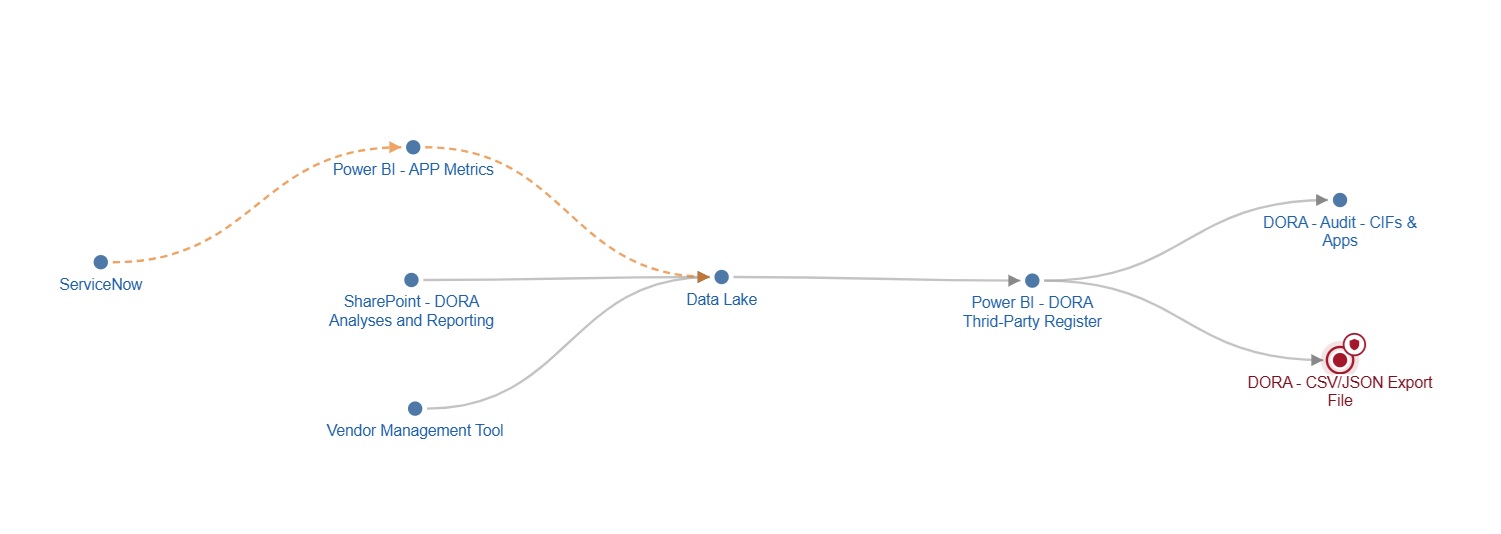
Trace each dataset from source to consumer, with its data classification and confidentiality, so you see where confidential and critical data actually flows.
See which assets and components run in development, test and production, and spot production dependencies that were never meant to be there.
See which projects build similar things and which reuse the same datasets and components, so a new project starts from what already exists instead of building it again.
Before a new project builds another flow or dataset, see which components and datasets are already in use, by which projects, and with what classification. Reuse what exists and keep the landscape lean.
What you get
One interactive up-to-date map instead of diagrams scattered across slides and wikis.
Spot duplicate applications and flows, and reuse what you already have.
Know every upstream and downstream dependency before you move or switch off a system.
Your technical connections and their risk classifications sit in the same map, so both sides see the same impact.
Who it's for
Everyone sees what they need, and acts with confidence.
Understand dependencies before making changes, and see which applications, APIs, databases, datasets or reports are connected.
Read moreSee the potential impact of projects and changes, without relying on individual team members to explain the landscape.
Read moreUnderstand where information comes from, how it moves through systems, and which reports or processes depend on it.
Read moreSee which assets and AI agents support your critical functions, with their classification, criticality and providers. Export your AI inventory report, ready for your auditor or regulator.
Read more